Repairs the crew spotted
The crew flags it in October. The customer says yes in November. It’s on the spring list.
Every dock company finds the same things on the fall pull: a frayed cable, a cracked bracket, a section that will not make another season. The trouble was never noticing — it was what happened to the note afterward. LakeOps records it against the piece it is on, lets the office put a price on it, and asks the customer in an email they can answer with one press. No account, no estimate document, no PDF. Their yes is the job.
It starts on the boat, against the piece
When a crew member sees something wrong they flag it on the exact dock section or lift it belongs to, with a photo and one of three words: watch, soon, or unsafe. Watch means fine for now, mention it next season. Soon means it should be done this year. Unsafe means do not use it until this is fixed — and that one is a record you will want to have made, in writing, on the day.
- Flagged on the piece, not in a notebook or a text to the office
- Three severities, so “mention it next spring” and “do not use this lift” are never the same list
- Works with no signal, like everything else the crew does — it goes up when the bars come back
- A photo goes with it, taken standing next to the thing
The office prices it, once, from your own list
Back at the desk the flagged items are one queue: spotted, then priced, then answered. Pick the service, type the number, and it is written against that piece with the finding it came from. Nothing is sent yet and no job exists — writing a price down is not the same as asking. When you do send it, the customer gets one email, and the number cannot be changed after it has gone out. Withdraw it and the link stops opening; the customer sees a plain sentence, not an error.
- Priced from your price list, so a lift-cable job costs what a lift-cable job costs
- One quote out per finding at a time — you cannot accidentally send two prices for one cable
- Free-standing too: price work nobody flagged, from the same screen
- Works whether or not you take payments through LakeOps
The customer answers from the email. That is the whole thing.
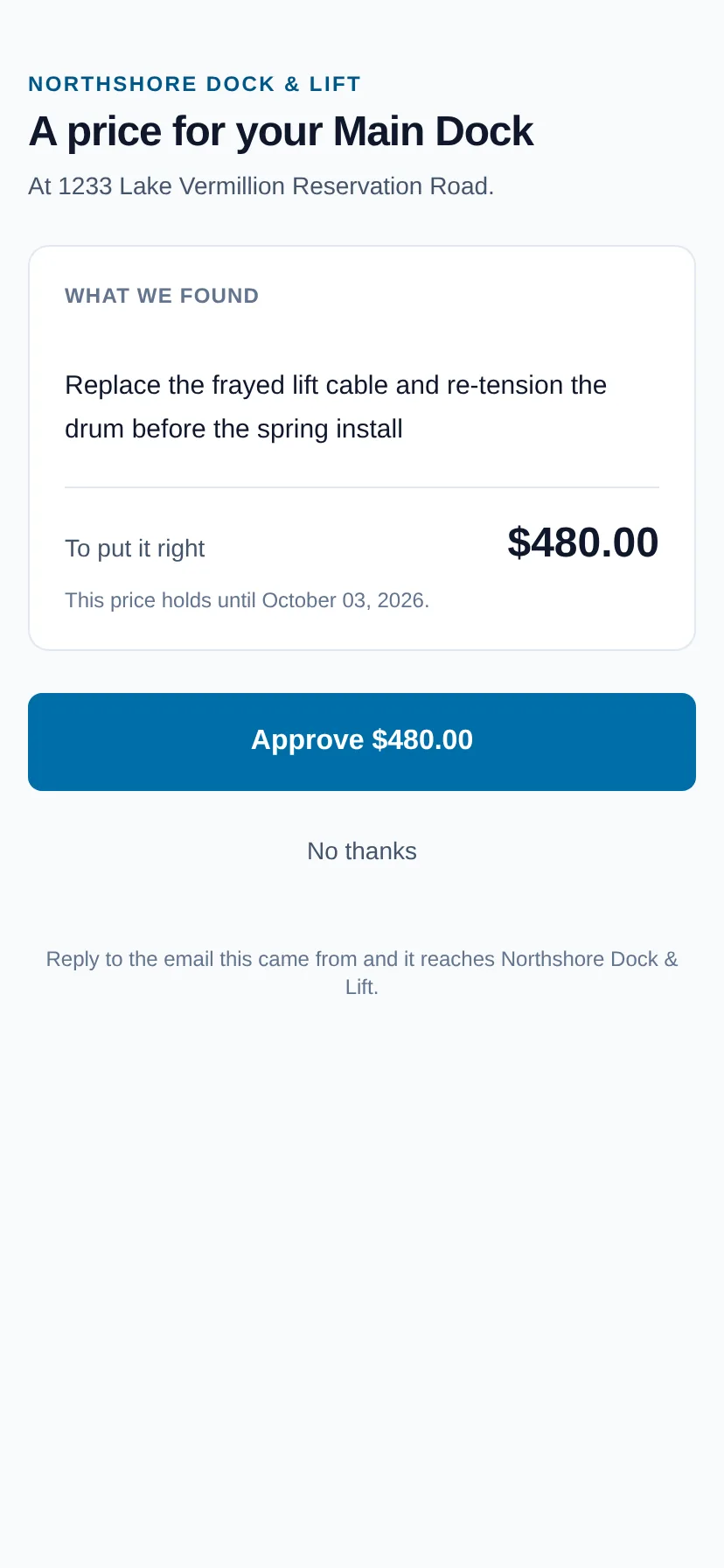
The link opens one page on their phone: what you found, one price, and how long it holds. Approve is one press and creates the job — it is the customer, not you, who puts it on the schedule. Declining opens a note first, because the reason is worth more to you than the refusal and nobody types one into a button. Either answer is recorded against the piece, so the next crew to visit knows what was found and what was decided.
- No login, no password, no app to install — the link is the credential and it opens one page
- A yes creates the job with the right service and the right piece already on it
- A no records why, and the finding can be quoted again later
- The customer’s answer is on the piece’s history, beside the photo that started it
Questions about this
- Is this an estimating or quoting document?
- No. There is no PDF and nothing to file. It is a question — what we found, what it costs — and an answer, and the answer is what makes the job. A shop that needs a formal estimate document for a large project can still write one outside LakeOps; this is built for the forty small repairs a season that otherwise get mentioned on the phone and forgotten.
- What if the customer never answers?
- The price holds until the date on the page, and the finding stays on the piece marked as quoted. You can withdraw the quote and send another, or leave it. Nothing is scheduled and nothing is billed until somebody says yes.
- Can the crew price the repair themselves, on the water?
- They flag it; the office prices it. A price is a decision about your business and the boat is the wrong place to make it — and the customer should hear one number from one place. The crew’s part is the flag, the photo and the word unsafe when it applies.
- Does the customer need an account?
- No. Lake-house owners will not maintain a password for a dock company, and we never ask them to. The link in the email is the credential and it opens exactly one page.
Put your own shoreline on the screen
Create the account yourself, import your customer list, drop a few pins, and you’re looking at your own water this afternoon. No sales call, no setup fee, and nothing charged until your first season generates work.
No card, no sales call, nothing to book — you're in within a minute. Send us a question if you'd rather ask a person first.